
🚨 Breaking 🚨 Shopify Stores are Getting WebMCP
Shopify quietly injected WebMCP tools into thousands of storefronts.

TL;DR:
Shopify rolled out WebMCP to the storefronts it renders. This was done silently, without any public announcement to date. A small script now ships on Shopify-managed stores and registers callable tools on every page. Agents can search the catalog, pull product details, manage the cart, start checkout, and open order history.
We spot-checked it by hand on Tea Collection, Reebok, Alo Yoga, Steve Madden, Fenty Beauty, Vera Bradley, Rhode, Huda Beauty, Stetson, Ridge, Salt & Straw, and more. All sites serve the exact same tools everywhere.
Shopify added WebMCP support to Hydrogen, its open source headless framework.
What we found
Sometime in the last few days, a new script started appearing on Shopify storefronts, served from https://cdn.shopify.com/storefront/webmcp/webmcp-0.0.3.js
This script gets loaded on every page of the store. What it does is it registers the store’s tools with the browser through WebMCP, so an agent shopping alongside the customer can call them instead of guessing at the UI (an agentic category referred to as “co-browsing”).
Every page on these shopify stores serves the same ten tools in total:
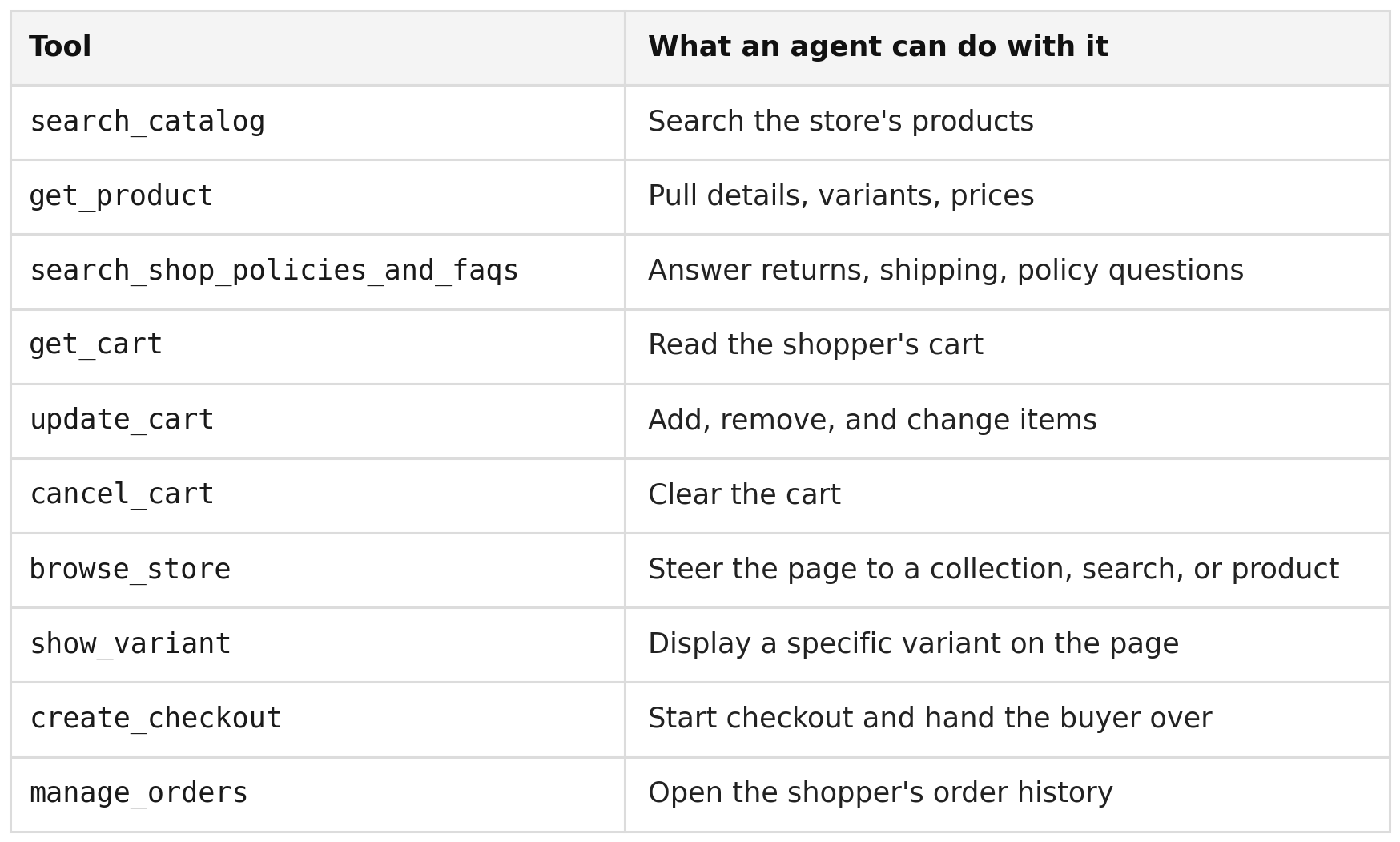
These tools come in two kinds:
Answer tools - Answer questions. Search, product details, policies. Behind the scenes they call the same MCP server every Shopify store already runs at /api/mcp, the one remote agents like ChatGPT shop through. Shopify reused the same infrastructure they have built for MCP to serve WebMCP.
Act tools - These tools allow the agent to steer the page the shopper is looking at, show a specific variant, manage the cart, open order history, and walk the buyer into checkout.
There is also a third kind, Transact tools: tools that move money or create a commitment that is hard to reverse (checkout, order, subscribe), so they need explicit user confirmation. Shopify’s ten tools don’t include any transact tools yet. The purchase itself is still done by the shopper.
We recorded a short demo of using a Shopify Tea Collection store with various WebMCP tools. You can notice the usage in Answer tools like “search_shop_policies_and_faqs”. And Act tools like “update_cart” and “create_checkout”.
Notice the difference from a remote agent experience An agent shopping through /api/mcp from inside a chat (for example through ChatGPT application) builds its own cart on Shopify’s backend and the shopper only gets a checkout link as a redirect at the end of this process. Two doors for the same store - one through co-browsing with WebMCP and one through an AI application with MCP.
We wrote a while ago the full explainer in WebMCP: Every Website Is Getting an Agent, as we believe this will have a major effect on websites. Google doubled down on it at I/O, and Chrome’s Lighthouse now checks whether your site supports it. Now the supply side (websites) are starting to catch up with the standard.
Why it landed on every store at once
Shopify storefronts come in a few flavors, and the difference between them explains the rollout

The vast majority of stores run Liquid themes on Online Store 2.0, where Shopify hosts and renders every page (this is the easiest setup which most Shopify stores use. More sophisticated store owners want more control and host and maintain their storefronts separately from Shopify). Shopify also added WebMCP support to the preview release of Hydrogen, its open source framework for headless storefronts (announcement, diff). Headless merchants still need to update the framework and deploy it themselves.
Same tools on every page
An interesting observation is that all the pages in the storefront, whether that’s homepage, a collection or a product page, they all get the identical tool set. WebMCP actually allows page-scoped tools, so the optimal implementation would customize each page with its own tools For example, a product page could expose a size-guide tool, a checkout page could expose payment tools. Shopify chose simplicity of deployment and rolled out the same tool set across every store because it’s much easier to manage at scale than letting each merchant customize their own tools. A one-size-fits-all approach is likely the right day-one choice, but over time we’d expect much more customized WebMCP implementations for individual stores. We found out that some tools get broken on various pages, because of this architectural choice.
Why this matters
Shopify has been the pace-setter for agentic commerce since day one. First-class agent support in Summer ‘25, Storefront MCP at /api/mcp, agentic storefronts by default, and now WebMCP in the browser. When Shopify sets a default, the rest of the ecosystem tends to copy it. So we expect other platforms, and millions of websites beyond commerce to follow.
What site owners should do
If you run a Shopify store on a Liquid theme, your site probably has WebMCP right now. Check the page source for webmcp, or look your store up in the directory, and see what the tools already let agents do. That is your new agent-facing front door.
If you want to play with the tools yourself, install our Ask nekuda Chrome extension, ask it to find a product, fill a cart, or check the return policy, and watch it call the store’s WebMCP tools instead of clicking around.
If you run headless, on Shopify or anywhere else, nobody flipped the switch for you. Exposing tools is now your job.
And for everyone, the next question is not whether agents can act on your site. As of this week, they can. The question is whether you can see what they do there, and whether the tools cover what your customers’ agents actually ask for.