
Cloudflare Agents Week Recap: The New Infrastructure for the Agentic Web
Cloudflare is positioning itself as an infrastructure provider for agents, with WebMCP leading the charge.

TL;DR
Last week was Cloudflare’s Agents Week. The name by itself says something about where the web stack is heading.
It published the WebMCP developer preview, which lets websites expose tools to browser agents without turning every implementation into a custom project.
Cloudflare is the main news, but it’s part of a broader pattern emerging across the industry. Shopify has now published official documentation for the WebMCP tools we previously found on its storefronts, while openai.com currently exposes a search_openai WebMCP tool on their website.
Making tools available is only the technical starting point. A website can expose WebMCP tools and still be unusable by agents because they can’t complete a real customer journey for all sorts of reasons - missing actions, unreliable behavior, or incomplete implementations.
Website teams still need to create complete agent journeys on the website - starting from what customers (or their agents) should be able to accomplish, connect the necessary actions from beginning to end, learn where agents succeed or get stuck, and have proper evals.
How Cloudflare is bringing WebMCP to more websites
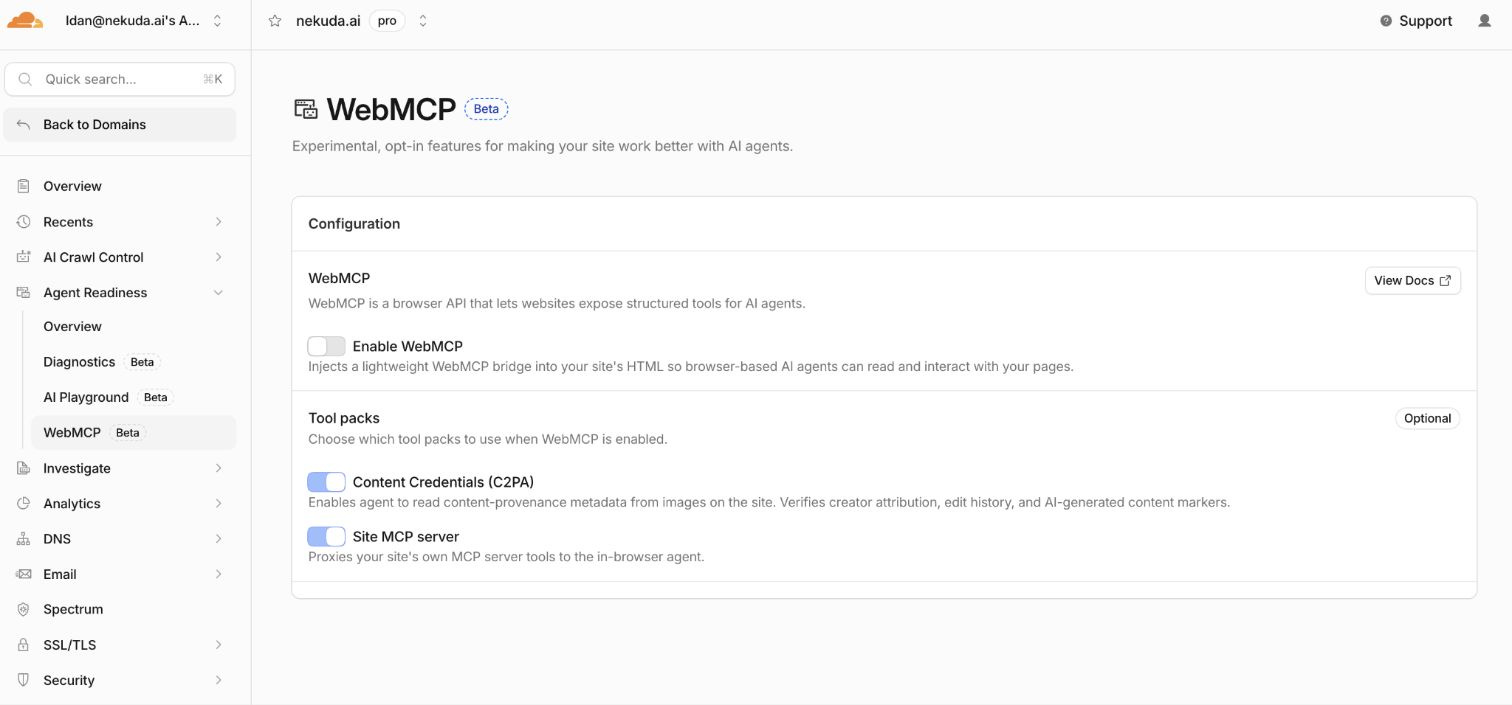
During Agents Week, Cloudflare introduced a developer preview that lets website owners enable WebMCP from the Agent Readiness dashboard. Because Cloudflare already sits between the website and its visitors, it can add a small script as each page is delivered. The website’s original code remains unchanged, and the team does not need to redeploy it.
In browsers that support WebMCP, the injected script exposes a set of tools that browser agents can call. In the current developer preview, Cloudflare includes two tool packs. The first lets agents inspect Content Credentials (C2PA) attached to images - essentially asking questions like who created this image, was it AI-generated, and has it been edited since it was published? (mainly aimed at publishers that want to expose image provenance to agents). The second exposes tools from a website’s existing MCP server, allowing browser agents to call those same tools directly from the page without requiring a separate integration.
Most websites were built for people, so an agent usually has to read the page, open menus, fill in fields, and guess which buttons to press. WebMCP gives it a cleaner route by letting the website publish defined actions the agent can call directly.
Cloudflare had already added WebMCP support to Browser Run, its remote browser service for agents (i.e. so browser instances can directly discover and call WebMCP tools). The two products sit on opposite sides of the same interaction. The new preview helps a website expose tools, while Browser Run gives an agent a browser that can discover and call them.
Cloudflare is making the connection easier, but it is not deciding which tools the website should offer (e.g. search, cart, booking, account actions etc.). That part still belongs to the website team.
The Cloudflare preview is important on its own, but it becomes more meaningful when the same direction appears in other parts of the web. Shopify has now published official documentation for the WebMCP tools we previously found on its storefronts, while openai.com currently exposes a search_openai WebMCP tool. The implementations are different, but they point in the same direction as more websites begin to expose structured actions through the platforms and infrastructure they already use.

A list of tools is not a customer journey
It may soon be easy for a company to enable WebMCP, expose a search tool, and call the site agent-ready even when an agent still cannot complete anything useful, because the real question is not how many tools exist but whether they support a complete customer journey. Consider what has to happen when a shopper asks for the following.
“Find me black running shoes for flat feet, under $150, available in size 11, and add the best option to my cart.”
Completing that request may require the site to search products, read detailed information, check stock, compare options, select the correct variant, update the cart, and show the final total. If even one action is missing or unreliable, the journey breaks.
That is why turning every API endpoint or button into a tool is the wrong starting point. The website team should begin with what the customer is trying to accomplish, then work backward to the actions the agent needs.
In our guide to building user and agent journeys with WebMCP, we group those actions into three practical types.
Answer tools help an agent understand what is available by returning information such as product details, inventory, prices, policies, or available rooms. These are usually the safest tools to launch first.
Act tools move the journey forward without making a final commitment, whether that means adding an item to a cart, selecting a variant, saving a search, or holding an appointment.
Transact tools create a real commitment by purchasing, booking, subscribing, or canceling. These actions need clear confirmation before they happen.
A useful journey often needs all three, and the website team needs to make sure they connect from the customer’s request to the final result.
What website teams should do now
The first thing most websites are missing is visibility into what agents are trying to do. Traditional analytics may show a pageview or a click, but they rarely show the customer’s actual goal or the point where the journey failed.
Tool calls can make that intent visible because each request is tied to a defined action. A product search can show the requested category, budget, size, and color, while a failed request can reveal which action was missing.
Once that intent is visible, website teams can improve the experience through a simple loop.
Expose a small set of useful tools.
See what agents ask them to do.
Find the missing actions and broken journeys.
Add or improve tools based on real demand.
Measure whether more journeys reach the intended outcome.
Start by finding out what your site already exposes and whether those tools cover a real customer journey. Shopify Liquid storefronts already have WebMCP tools, while sites running through Cloudflare can explore the new preview and see which tools they can make available.
For a custom or headless site, choose one important customer outcome and work backward from it rather than creating a tool for every button. Some simple journeys may already exist as website forms, and as we explained in Making Your Website Agent-Ready: The Easy Way, those forms can sometimes be exposed to agents without rebuilding the whole workflow.
Whatever the starting point, the website team should track what happens so it can see what the agent wanted, which tools it called, what happened next, and where it stopped.
The bottom line
Cloudflare is making WebMCP easier to adopt, which should help more websites expose useful actions to agents without treating the protocol as a custom infrastructure project.
That easier setup will not make the resulting experience useful on its own, so the real measure of an agent-ready website is not how many tools it exposes, but how many customer goals an agent can complete safely and reliably.
The runtime and state primitives are genuinely useful, but what I notice missing from most agent-infrastructure announcements is the trust layer: how does an agent on one tenant's Worker authenticate itself to an agent on another's? Without cross-tenant identity and attestation, you get islands of capable agents rather than the interconnected 'agentic web' the framing promises. Durable Objects solve state; they don't solve provenance.